Friday, 19 June 2020

Section 2b Tokens in C

C Tokens

C tokens are the basic building blocks in C language that are used to write a C program

Every individual unit in C program is called a token

The following are the 6 types of tokens in C
1) Keywords  : The reserved words is C that cannot be used for variable        
                   (eg:  auto, double, enum )

2) Identifiers    : Names given to constants, variables, structures , functions, array etc

They are used for naming of variables, functions, array etc. These are user-defined names which consist of alphabets, number, underscore ‘_’.  Keywords are not used as identifiers.

3) Constants : These are fixed values used in the program and do not change during the program execution

They can be of any of the basic data types like an integer constant, a floating constant, a character constant, or a string literal. There are enumeration constants as well.

Constants are treated just like regular variables except that their values cannot be modified after their definition.

Types of constant
  1. Integer constants
  2. Floating point constants
  3. Character constants
  4. String constants
  5. Backslash character constants
 How to define constant?

There are two simple ways in C to define constants −
  • Using #define preprocessor.
  • Using const keyword.
Ref: testconst.c, testconst1.c
       
4)  Strings

A string is an array of characters ended with a null character(\0). This null character indicates that string has ended. Strings are always enclosed with double quotes(“ “).
Let us see how to declare String in C language −
  • char string[20] = {‘H’,’e’,’l’,’l’,’o’, ‘\0’};
  • char string[20] = “Hello”;
  • char string [] = “Hello”;
 Ref: teststring.c

 5) special symbols
    eg : (), {}

6) Operators

     C operators are symbols that are used to perform mathematical or logical     manipulations

  1. Arithmetic Operators - ( +, /, -, *)
  2. Relational Operators - ( > , < , != )
  3. Logical Operators (&&, ||, !)
  4. Assignment Operators ( -, +=)
  5. Increment and Decrement Operators  ( ++, -- )
  6. Conditional Operator (?:)
  7. Bitwise Operators ( <<, >>, &, ^, |)
  8. Special operator
    1. & -- address of the memory location
    2. * pointer to a variable 

Example:


int main()
{
   int x;
   x = 10;
 
   printf ("x = %d \n", total);
}

int - keyword
x  -  identifier
=  - operator
main - identifier
(), {}-  special symbols


Monday, 15 June 2020

Section 3a Array in C

C Arrays

Array : Data Structure used to store fixed size elements of the same type. It is used to store collection of elements of the same type

Each element of the array is accessed by index.

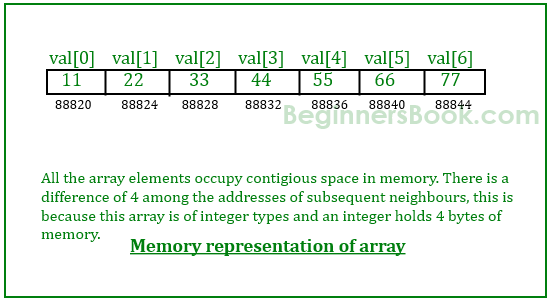
They are allocated contiguous memory locations

Declaring Arrays:

Specify the c data type and the variable name, along with the array size

Declare Array

To declare a 5 element array called salary,

int sal[5];

Initialize Array 

Can  initialize during declaration or later during program execution one by one
later.

int sal[4]  = { 1000, 2000, 3000, 4000 };

If the size of array is not specified, then an array big enough to hold  4 elements will be created.

int sal[]  = { 1000, 2000, 3000, 4000 };

Accessing array elements


Array elements are accessed using the array index. Array indexing starts from 0th element

sal[1] = 2000;

In one dimensional array, array name serves as pointer to the base element, ie pointer to the first element.

ref: testarray.c

Array Memory Representation

( from https://beginnersbook.com)

c-arrays

Operations on Array:

Insert 
   Beginning
   At a specific position
   End
Delete

ref: testarrayop.c

Two Dimensional Array Representation

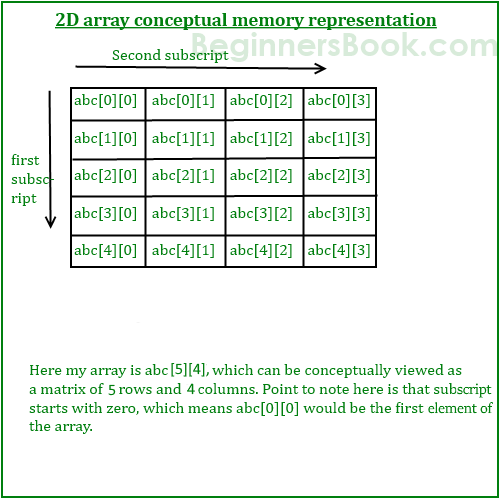
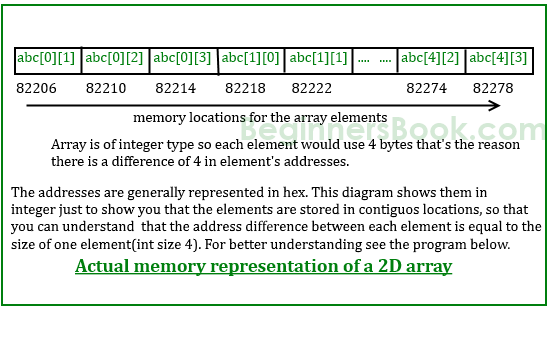
Two dimensional arrays can be thought of as an array of arrays.  It is used to represent collection of data as rows and columns

from https://beginnersbook.com


2D-array
  
memory-2D-diagram 
How to declare 2 dimensional array

data type array_name[rows][column]

To define an integer 2 dimensional array with 3 rows and 4 columns
int test_arr[5][3];

Declare and define 2 dimensional array

int test_array[5][3] = {
                                 {1,2,3},
                                 {5,6,7},
                                 {9,10,12},
                                 {0,1,2},
                                  { 10,11,12}
                                };


ref : testtwodimarray.c

Finding the largest and second largest element in an array


Monday, 8 June 2020

Section 4a Pointers in C

What is a pointer?

A pointer is a variable that stores the address of another variable.
This variable can be of type int, char, array, function, or any other pointer.


The unary operator & (ampersand) returns the address of a variable
For example &x gives us address of variable x.

ex:
int main()
{
    int x;
 
    // To print address of x
    printf("%p", &x);
 
    return 0;
}

The unary * (Asterisk) operator  is used for two things :

a) To declare a pointer variable: The pointer in c language is declared  using * (asterisk symbol)

int  *height;  --> pointer variable height holds the address  of a integer variable
char  *alphabet;  --> pointer holds the  address of a character variable
 Example:
#include <stdio.h>
int main()
{
    int x = 10; //declare integer variable
 
    int *ptr;  // pointer to an integer variable
 
    ptr = &x;  // get the address of x and assign it to pointer variable
 
    return 0;
}

b) as indirection pointer used to de-reference a pointer.

To access the value stored in the address,  the unary operator (*)  is used. It  returns the value of the variable located at the address specified by its operand. This is also called Dereferencing.

Example:

// Print the value at address stored in ptr. Value stored is value of variable "x"

    printf("Value of x = %d\n", *ptr);

reference: testptr1.c


Pointer Arithmetic

C language provides a set of operators to perform arithmetic and comparison of memory addresses. Pointer arithmetic and comparison in C is supported by following operators -
  • Increment and decrement ++ and --
  • Addition and Subtraction + and -
  • Comparison <, >, <=, >=, ==, != 
incrementing a pointer will cause the pointer to point to a memory location skipping N bytes from current pointed memory location. Where N is size of pointer data type.

Similarly, decrement operator returns the previous address pointed by the pointer. The returned address is the difference of current pointed address and size of pointer data type.

Consider that ptr is an integer pointer which points to the address 1000. Assuming 32-bit integers, perform the increment operator on pointer.

Pointer increment and decrement operator
 
If ptr points to a character whose address is 1000, then the above operation will point to the location 1001 because the next character will be available at 1001.

Consider the operation ptr++

After the above operation, the ptr will point to the location 1004 because each time ptr is incremented, it will point to the next integer location which is 4 bytes next to the current location.

ref testptr2.c

Pointer Addition and Subtraction

Pointer increment operation increments pointer by one. Causing it to point to a memory location skipping N bytes (where N is size of pointer data type).

increment operation is equivalent to addition by one. Suppose an integer pointer int * ptr. Now, ptr++ is equivalent to ptr = ptr + 1.

Similarly, you can add or subtract any integer value to a pointer.
Adding K to a pointer causes it to point to a memory location skipping K * N bytes. Where K is a constant integer and N is size of pointer data type.

ref testptr3.c 

Pointer Comparison

Pointer comparison compares two pointer addresses to which they point to, instead of comparing their values.

1) Suppose we want to test if 2 pointers point to the same location

int x  = 10;

int *ptr1 = &x;
int *ptr2 = &x;

if ( ptr1 == ptr2 )
{}

2) Suppose we want to check if the pointer is within array range

int x[10];
int *ptr = &x[0];

ptr < &x[10];   // Check if the ptr is within the array range


ref testptr4.c  

Pointer to pointer

A pointer to a pointer is a form of multiple indirection.A pointer contains the address of a variable. In the case of pointer to a pointer, the first pointer contains the address of the second pointer. The second pointer  points to the location that contains the actual value.

This is also referred to as double pointer.

syntax:

datatype  **ptr_varble_name

Example to initialize and use double pointer

int num;

int *ptr = &num;
int  **dpte = &ptr;

ref testptr5.c  

Pointers and Array

An array name is a constant pointer to the first element of the array.

consider the following:

int sal[10];

In this declaration, sal is a pointer to sal[0], which is the address of the 0th element of the array.

So , this fragment of code is true:

int *ptr;

int sal[10];

ptr = sal; // This is the address of the 0th element of the array ie &sal[0]
Once you get the address of the first element in 'ptr', you can access the array elements using *ptr, *(ptr+1), *(ptr+2) and so on. 

Reference

int sal[5];
int *ptr = sal;        // Integer pointer pointing at sal[0]

sal[0] = 100;         // Assigns 100 to sal[0]
ptr++;                  // ptr now points at sal[1]
ptr--;                     // ptr now points back at sal[0]

*(ptr + 4) = 400;  // Assigns 400 to sal[4]. Hence (ptr + 4) will point at sal[4]

*(sal + 0) = 10;        // Assigns 10 to sal[0]

Note: Array name ie sal behaves as a constant and cannot be modified ie operations like sal++ ie ( sal = sal + 1) is not possible

ref: ptrarray.c

Constant Pointer and pointer to constant

constant pointer

 This is a pointer variable whose value cannot be changed throughout the program, ie the memory pointed to by  the pointer variable cannot be changed. However the value stored in the memory location can be changed
 
example declaration

int num1, num2;
int * const cnst_ptr = &num1; 

num1 = 10;

num2 = 20;

cnst_ptr = &num2 // not allowed

*cnst_ptr = 200 ; // allowed
 
pointer to constant
The pointer points to a memory location whose value cannot be changed.

int num = 10;
const int * ptr1 = &num;    // Pointer to constant

* ptr1 = 100 //not allowed

constant pointer to pointer

 It is a pointer that does not allow modification of pointer value as well as value pointed by the pointer.

Example:

int num4 = 100;
int num5 = 600;

const int * const ptr3 = &num4;

ptr3 = &num5; // This will throw error, pointer value cannot be changed
*ptr3 = 800; // This will throw error, value pointed to by the pointer cannot be changed

ref constptr.c

Void Pointer , Null Pointer

Void Pointer

A void pointer is a pointer that has no associated data type with it.
A void pointer can hold address of any type and can be type casted to any type ie it can point to any datatype. It is also know as type less pointer
A void pointer is a type

ref voidptr.c

Null Pointer
A null pointer is a value.  It is a special reserved value used to indicate that the pointer is not pointing to anything conceptually
A Null Pointer is a pointer that does not point to any memory location.

Conceptually, when a pointer  has a null value , it is not pointing anywhere.

Usually a null pointer points to:

    the address 0 or an address that's illegal for user code to access

The null pointer basically stores the Null value
When a NULL value is assigned to the pointer, then it is considered as a Null pointer.

When we use a malloc() function to allocate memory, if the function is unable to allocate memory , it returns a null pointer.

ref nullptr.c

Dangling Pointer

A pointer  pointing to a memory  that is freed or deallocated  is a dangling pointer.
The pointer still points to the memory location of the de-allocated memory.

The  following are the 3 situations in which a pointer becomes a dangling .

1. Deallocation of memory:
    When the memory pointed to by the pointer is deallocated , then the pointer becomes a dangling pointer
   
   
2. When a variable goes out of scope, the pointer pointing to the variable becomes
    a dangling pointer

3. A pointer to a variable in a function call becomes a dangling pointer after the execution of the function call.

Ref : danglptr.c danglptr1.c


Monday, 13 April 2020

Section 2d Operators in C

C Operators  

1. Arithmetic operators

The Arithmetic Operators in C: To perform Mathematical operations/calculations like  calculations like addition (+), subtraction (-), multiplication (*), division (/) and modulus (%).

  1.  + (Addition) – To add two operands.
  2. – (Subtraction) –  To Subtract two operands.
  3. * (Multiplication) – To Multiply two operands.
  4. / (Division) – Divide two operands and gives the quotient as the answer.
  5. % (Modulus operation) – Gives the remainder after the division.
  6. ++ (Increment) –To increment an operand.
  7. — (Decrement) – To decrement an operand
  ref testarithmetic.c

2 .Relational Operators

Used to compare 2 numbers or quantities


==, !=,  >, < , >=, <=


  ref testrelational.c

3. Logical Operators : Used to test more than one condition to make decisions. These are && (AND) , ||(OR)  , !  (Not)

ref testlogical.c

4.   Bitwise operators : They are used for  manipulating data at bit level

Bit wise operators in C:These operators are used to perform bit operations
&      Binary AND Operator
^      Binary XOR Operator
|        Binary OR Operator
<<    Binary Left Shift Operator
>>    Binary Right Shift Operator
~       Binary Ones Complement Operator

ref: testbitoperator.c

5. Assignment operators : 

These are used to assign values to variables.

=         Assign the vale
+=      Increment the variable by the value  and assign
-=        Decrement the variable by the value and  assign
*=        Multiplie then assign
/=        Divides then assign
%=      Modulus then assign
<<=    Left shift and assign
>>=    Right shift and assign
&=       Bitwise AND assign
^=       Bitwise exclusive OR and assign
|=        Bitwise inclusive OR and assign

6. Conditional operator

The Conditional Operator in C, is  used in the decision-making process in place of  conditional statements if and else statement, to replace a short if else statement in c

Syntax of ternary operator

condition ? value_if_true : value_if_false

ref: testtern.c

7. Special operator 

& operator is used to get the address of the variable
* operator stores or points to the address of another variable
sizeof() is a compile-time operator that determines the size of variable in bytes


ref testspecop.c


Thursday, 2 April 2020

Sessions 2c Literals and Format Specifier in C


Literals in C

Values assigned to constant variables are known as literals.


There are 4 types of literals in C 
 
integer 
float
character
string
 
const int testint = 10;

Format Specifier in C

To print the value stored in a variable you use the format specifier operator.
This is used in the printf() function.


Format Specifier Description
%d

Integer

%f

float

%c

character

%s

string

%u

unsigned integer

%ld

long int

Tuesday, 31 March 2020

Session 2a Data Types in C

c data types

C data types - Storage format for  a variable to store data to perform a specific operation.

Basic Data type in C language

Primitive Data Type: Inbuilt data type provided by C language
    - int, float, double, char and void

Non primitive data type : These are derived from the primary data type

     - arrays  , pointers

User Defined Data types
      - Structure, Union, Enumeration

Other way of classifying

Primary
    Character – char, signed char , unsigned char

    Integer
        signed – int, short int ,long int
        unsigned – int, short int, long int
    Float  - float , double , long doulbe
      
    Void

Derived
    Array , pointer, structure, union enum


Basic/Primary Type/ primitive

int, char, float, double
Enumerated Type

Enum

Void Type

void

Derived Type

pointer, array, structure, union


1) 

a)Integer

Integer data type is used to store numeric values in a variable.
int is the keyword used to refer integer data type.
The storage size of int data type is 2 , 4 or 8 bytes

This depends on the upon the processor in the CPU that we use. For a 16 bit processor, 2 bytes (16 bit) of memory will be allocated for int data type.
For 32 bit processor 4 bytes or 32 bits and for 64 bit processor 8 byte or 64 bits are allocated for int datatype.

Signed and Unsigned Variables

Signed variables, such as signed integers is used represent numbers both in the positive and negative ranges.

Unsigned variables, such as unsigned integers, is used to represent numbers in the positive
Two's complement Method 
Two's complement is the most common method of representing signed integers in computers

In two’s complement form, a negative number is the 2’s complement of its positive number

How to get 2's complement of a number

Assume we are using 8 bit form and want to represent  -28 in binary form.

a) 28 in binary form is : 00011100

b) Then we invert the digits. 0 becomes 1, 1 becomes 0.: 11100011

c) Then we add 1. 11100100
That is how one would write -28 in 8 bit binary.

For a 8 bit signed integer

127 is represented as 01111111
-127 is represented as 2’s complement of positive 127, ie 10000001

Get the Max and min values of signed and unsigned

Unsigned data types:

int max = pow(2, number of bits assigned to data types) — 1;

Signed data types:

int min = ( pow(2, number of bits assigned to data types) / 2) * -1;
int max = (pow(2, number of bits assigned to data types) / 2) - 1;

For 16 bit

Unsigned – > 2 power 16 - 1 = 65536 – 1 = 65535

Signed

int min = (2 power 16 ) /2 * (-1) = 65536/2 *(-1) = -32768

int max = ( 2 power 16 / 2) -1 = 32767


Integer Type 

Consider a 16 bit machine


Type Size
(Bytes)
Range


int or signed int
2


-32,768 to 32767
unsigned int

2

 0 to 65535

short int or signed short int
1


-128 to 127

unsigned short int
1


0 to 255
long int or signed long int 4


-2,147,483,648 to 2,147,483,647
unsigned long int 4


0 to 4,294,967,295

Consider a 32 bit machine


Type

Size(Bytes  Range

int

4


short int

2


long int

8


Refer: testint.c

b) Char


It stores a single character and requires a single byte of memory in almost all compilers.

Char is a data type which is  used in C programming for storing characters like letters and punctuation marks. However, it still remains to be an integer type. This is due to the reason that char type technically stores integers and not characters.

It makes use of a numerical code which represents characters by using integers. For example – ASCII code which is one of the most commonly used codes for carrying out such interpretations.

The transformation of char into int values is done automatically by C. However, it is still dependent on the machine which decides that the result would be negative or not. The upper case A is equivalent to integer value of 65.

The terms unsigned and signed used with char means that if the content of these eight bits is interpreted into an integer then these terms can make some difference. Character data type is usually of type unsigned by default. However, In C++ and ANSI C mode, there is an option to explicitly declare them as signed or unsigned char.

In unsigned char 8 bits are used as data bits, whereas in memory representation of signed char 1 bit (most significant bit) is used for signed bit and 7 bits are used as data bits. If the signed bit is 0 it means that number is positive. If signed bit is 1 then number is negative.

 
Type Storage Size Value Range
Char 1 byte -128 to 127 or 0 to 255
unsigned char 1 byte 0 -255
Signed char 1 byte -128-127

The char data type can be either signed or unsigned. It depends on the compiler and platform.

While the character data type is commonly used to represent a character (and that's where it gets its name) it is also used when a very small amount of space, typically one byte, is needed to store a number. A signed char can store a number from -128 to 127, and an unsigned char can store a number from 0 to 255. When used to represent a character, however,  that signed or unsigned is irrelevant

Refer : testchar.c

c) float and double

float and double are two different data types in C for storing real numbers. double occupies twice the memory occupied by float

The size of float (single precision float data type) is 4 bytes. And the size of  double (double precision float data type) is 8 bytes.

 float: It is used to store decimal numbers (numbers with floating point value) with single precision.( Occupies 32 bits of memory.)


double: It is used to store decimal numbers (numbers with floating point value) with double precision. ( Occupies 64bits of memory )

2) Enumerated Data type

This is a user defined data type in C.

It can have only one value

3) void

Specifies that no value is available . It is used in the following cases

1. When a function does not return any value void test_fun(int input_val)

2. When a function does not take any input argument  int test_fun(void)

3. pointer to void

A void pointer is one which does not have any data type associated with , what is means is that  it can be assigned a value of any type.

It is capable of storing address of any data type. 

     void *ptr;
    int intval; char charval;

    ptr = &intval; //ptr changes to integer pointer as address of integer is   assigned to it

    ptr = &charval; //ptr changes to character pointer as address of character is assigned to it

Note: Null pointer is different from void pointer

A null pointer is one which is not pointing to anything, i.e. it is assigned a null value.
If there is no address to assign to a pointer, it is better to set it to null.

Syntax: <data type> *<variable name> = NULL;
Example: int *ptr = NULL;
          char *ptr = '\0';

ref: testvoidptr.c


Derived data types: Pointer, array, structure, 
We will see in further sessions 


Friday, 27 March 2020

Session 1 compilation , installation, structure of C program

C Compilation

The C source code needs to be "compiled", into machine language so that the CPU can actually execute the program as per the instructions given.  The compiler compiles the source codes into final executable programs. The most frequently used and free available compiler is the GNU C.

Installation on Linux

If you are using Linux or UNIX, then check whether GCC is installed on your system by issuing the following command

$ gcc -v

If gnu compiler is installed , then you will get the following message:
$ Using built-in specs.
COLLECT_GCC=gcc
COLLECT_LTO_WRAPPER=/usr/lib/gcc/x86_64-linux-gnu/5/lto-wrapper
Target: x86_64-linux-gnu

If gcc is not installed, install it from

https://gcc.gnu.org/install/


Structure of C Program

a) Comments Section

b) Pre processor Statements

      Header file Inclusion,  Macro Statements

c) global declaration section

d) main() function where the program execution begins

    The execution of the program begins at the opening brace '{' and ends       with  } the closing brace
      This has the local declaration of variables  used in the program
      The body of the program that has the Program Statements and Expressions

e) Return statement
     This refers to the return of the values from the function. The return vale depends on the return type of the function. A void function does not have a return statement

First C Program -> Hello.c

/* Author: s.Kalpalatha
Writes the words "Hai Hello, World!" on the screen
compile:  gcc hello.c -o hello
Run : ./hello
*/

#include<stdio.h>

int main()
{
    printf("Hai Hello, World!\n");
    return 0;
}
~ 


Saturday, 7 March 2020

Session 1a Steps involved during C compilation


About me

I am a technology enthusiast. I like programming and continuous learning. I also like to teach what I have learnt from  my academic program , my rich experience in the Industry and my research experience at Indian Institute of Technology , Chennai.

I like to listen to Carnatic Music. I  like to play the divine Musical Instrument , Veena which I had learnt during my school.

My primary interests are in the following areas:

1. C Programming
2. Data Structures and algorithms
3. Python Programming
4. Computer Networks
5. Java Programming
6. Wireless Lan Networks
7  Network Programming
8  Database
9  Operating Systems
10 Vi editor


My Dreams

1. Want to be a part of an organization that focuses of Network and Network Related products.

2. Contribute significantly to the organization and grow with the company.

3. Consolidate all my learnings and create materials and teach the student community

4. Continuously sharpen my skills and be a good developer always

5. Continue to learn Veena and eventually start teaching